

Skip to content
Cleaning Operator

Cleaning type

Software for end of tenancy cleaning

Flat-rate deep cleans priced by the property, before-and-after photos and signed checklists on every job, and agents or landlords paying on invoice.

14-day free trial on every plan. Cancel anytime, no lock-in contract.

A man cleans the floor beside a plain white wall in a minimal, well-lit interior
A floor being cleaned in an empty, freshly painted room
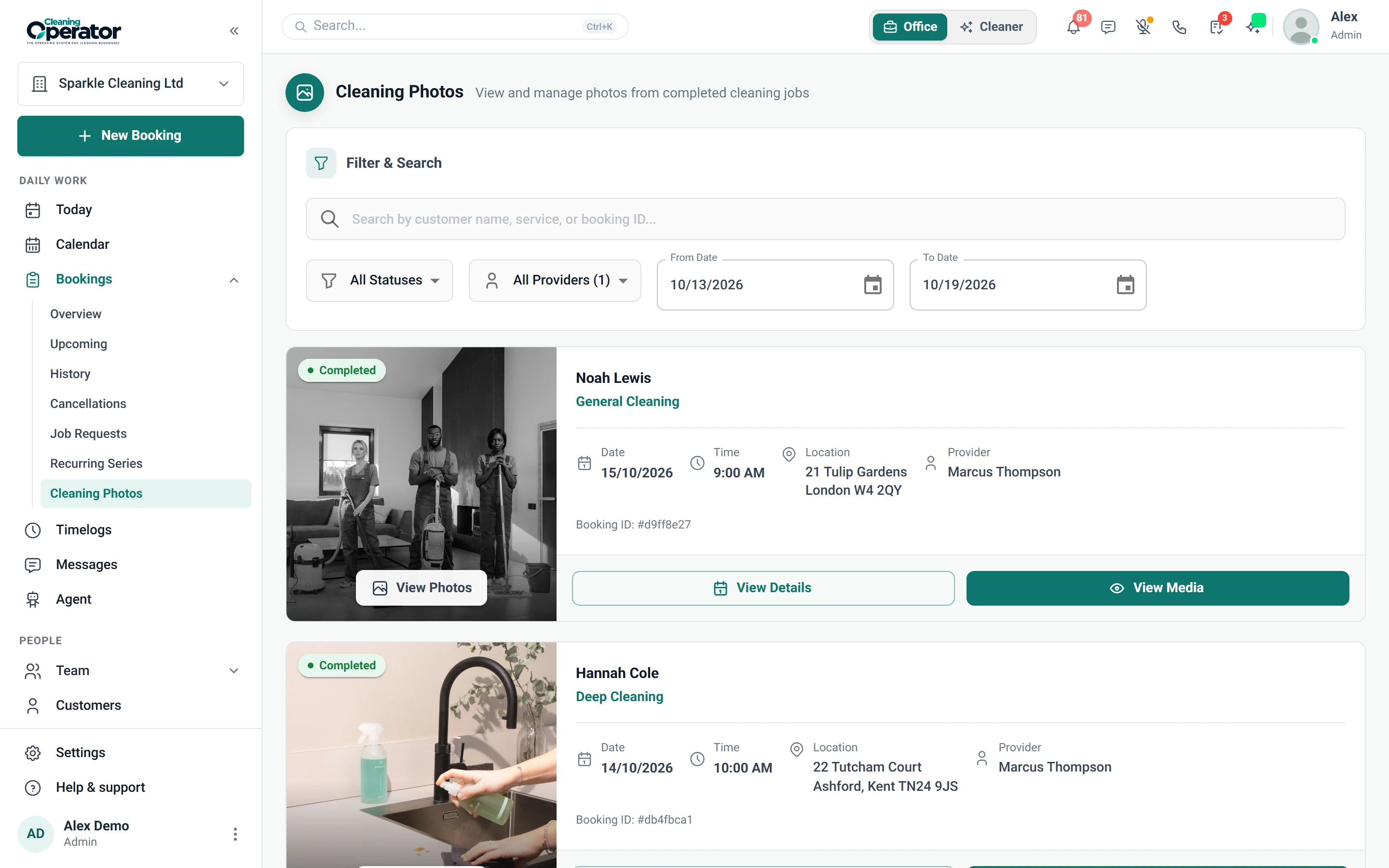
Screenshot of Bookings — Cleaning Photos

6 features from the reference

What changes for an end of tenancy specialist.

Each problem and fix below is quoted from the feature reference. End of tenancy specialists and letting-agent suppliers use the same Cleaning Operator as every other cleaning company; these are the parts that matter most.

The problem

Two people quote two prices for the same clean, and weekend rates and discounts for regulars are guesswork.

With Cleaning Operator

Everyone books from the same price list. You set hourly or flat rates, weekend rates and recurring discounts, and choose who sees each service.

  • Hourly or flat rate, with optional weekend hourly or weekend flat rates
  • Visible to Customers (portal) and Visible to Public (form and embed) can be set separately
  • Recurring Options and Discounts (percentage off for chosen frequencies)

The problem

Cleaners turn up to find four bedrooms instead of two, or a dog nobody mentioned.

With Cleaning Operator

Details like bedrooms and pets are on the booking before anyone arrives. A service can ask its own questions, and required ones must be answered.

  • A Requirements step appears automatically when the service has questions
  • Required questions must be answered before the booker can continue
  • Answers are stored on the booking

The problem

A customer insists the oven wasn't cleaned, and all I have is the cleaner's word.

With Cleaning Operator

Before-and-after proof sits on the booking itself. Cleaners add photos from the job, and you check them in Bookings under Cleaning Photos.

  • Opened from job media on the job
  • The office reviews them under Bookings → Cleaning Photos
  • Before-and-after proof attaches to the booking

The problem

Every cleaner has their own idea of a finished clean, and new starters miss the skirting boards.

With Cleaning Operator

Cleaners work from your list, not their own idea. Build checklists with ticks, notes, photos and signatures, and attach them to the right services.

  • Building blocks: heading, text, short and long input, image upload, dropdown, checkboxes, radio buttons and a signature pad
  • Assigned to services and can be overridden per booking
  • Show completed checklists to customers is a Customer Portal setting

The problem

Commercial clients pay on invoice, and matching each payment back to the right booking is a job in itself.

With Cleaning Operator

Bookings are marked paid when the customer pays the invoice. Pick Invoice as the payment method, and it's generated on your invoice schedule.

  • An invoice is generated on your invoice schedule
  • Separate from the Cash and Card checkboxes on customer-facing forms
  • Turned on under Invoice Settings

The problem

Door codes and pet instructions get buried in WhatsApp, so cleaners ring me from the doorstep.

With Cleaning Operator

Access notes and pet instructions reach your cleaners on the day. Add them while booking, and choose which checklist applies to that job.

  • Special instructions reach the cleaner on the day
  • Staff can override the checklists for this job
  • Default checklists are set under Settings → Checklists

Booking → the day → paid

A deep clean, from the agent's call to the paid invoice.

  1. 01Booking

    The agent books a flat-rate clean

    Book the whole job before the customer hangs up. One form handles the customer, service, extras, time, cleaners and payment.

    Smart or Manual cleaner assignment, with duration and price overrides (each with an optional reason)

    Booking → Admin booking form

  2. 02The day

    Photos and a signed checklist on the job

    Before-and-after proof sits on the booking itself. Cleaners add photos from the job, and you check them in Bookings under Cleaning Photos.

    Before-and-after proof attaches to the booking

    Cleaner dashboard → Job photos in the app

  3. 03Paid

    The agent pays the invoice

    Bookings are marked paid when the customer pays the invoice. Pick Invoice as the payment method, and it's generated on your invoice schedule.

    An invoice is generated on your invoice schedule

    Payments → Invoice as a booking payment method

Professional, from £59 / $79 a month

The plan for an end of tenancy specialist.

For small cleaning teams getting bookings, the calendar and payments in one place. Every plan includes a 14-day free trial, and you can cancel anytime from billing.

Professional

For small cleaning teams getting bookings, the calendar and payments in one place.

£59 pounds per month$79 US dollars per month

Includes a 14-day free trial

cleaner accounts
8
office users
3
service category
1

Includes:

  • Bookings and recurring work
  • Day, week and month calendar
  • Card payments and invoicing
  • Mobile app with clock-in and job photos
Start free trial

Cancel anytime, no lock-in contract.

On Business, £119 pounds per month$149 US dollars per month a month

Everything in Professional, plus:

  • 20 cleaner accounts
  • 10 office users
  • 3 service categories
  • Team calendar views
  • Payroll
  • Pay split between cleaners
  • Recruitment
  • Website builder
  • SMS with your own Twilio keys

Customers, bookings and cleaners carry across when you move up.

Every plan includes

  • Bookings and recurring work
  • Customer records
  • Day, week and month calendar
  • Card payments with Stripe
  • Invoicing
  • Messages
  • Clock-in and job photos
  • Checklists
  • Email templates
  • Cleaner contract e-signing
  • Dashboard
  • Mobile app for cleaners and the office

Bring your own accounts. Card payments run through your own Stripe account. SMS and voice calling connect through your own Twilio keys; SMS is included from the Business plan.

Questions

Questions from end of tenancy specialists and letting-agent suppliers.

Answered from the feature reference and the pricing page, not from a sales call.

Can we price by the property rather than by the hour?

Yes. Services can be flat rate, with an optional weekend flat rate. Service questions such as bedrooms or property type appear on the form, and extras with a quantity add price and minutes. On the admin booking form the price and duration can be overridden, each with an optional reason.

What proof do we have if a deposit is disputed?

Cleaners add before-and-after photos from the job, which attach to the booking and are reviewed under Bookings → Cleaning Photos. Checklists can include image uploads and a signature pad, and clock-out can be blocked until the checklist is done. You can also require a photo at clock-in and clock-out. Completed checklists can be shown to customers in the portal.

Can a letting agent with many properties pay on invoice?

Yes. The agent is one customer record with more than one address. Staff pick Invoice as the payment method on each booking, the invoice is generated on your invoice schedule, reminders go out automatically, and the agent pays by card from a link without a portal login.

Where do keys and access instructions go?

On the booking. Access notes added while booking reach the cleaner on the day in the Job details screen, and job messages sit in a thread the rest of the office can see.

Is end of tenancy work kept apart from our other cleaning?

Yes. End of tenancy work sits in its own industry, so Domestic, Commercial and End of Tenancy stay separate on the booking form and in reports. The Financial Report filters and breaks down by industry. Each industry is a service category: Professional includes 1, Business 3 and Enterprise has no limit.

Something not covered? Contact us

Start today

Flat-rate cleans, photographed and signed off.

Before-and-after photos and a signed checklist on every job, with agents and landlords paying on invoice.

14-day free trial on every plan. Cancel anytime, no lock-in contract.