
Skip to content
Cleaning Operator

Get paid faster

Financial, review and booking reports

We're flat out every week, but I couldn't tell you what we actually made.See what you earned, what you paid out and what changed on bookings, without stitching spreadsheets together first.

14-day free trial on every plan. Cancel anytime, no lock-in contract.

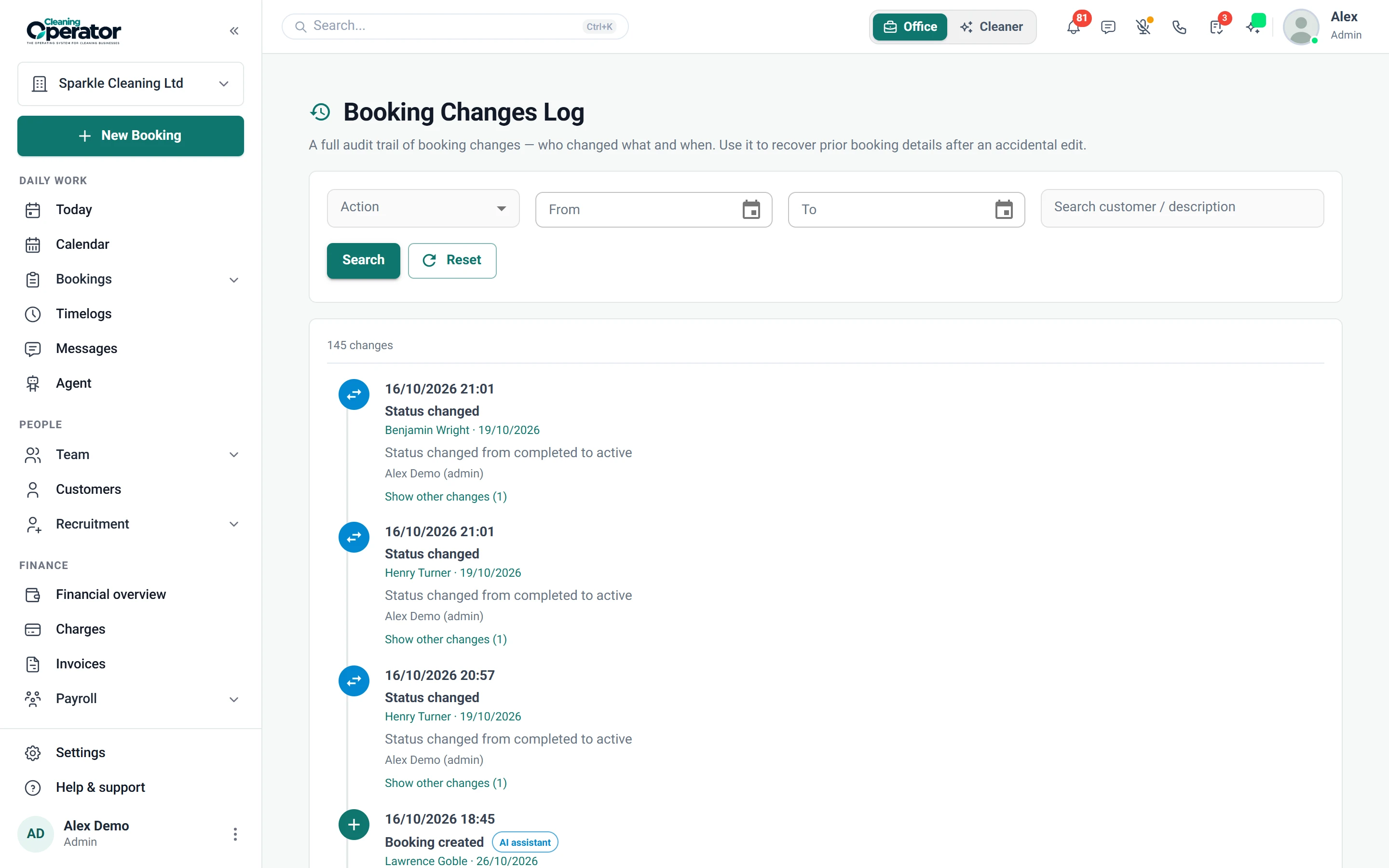
Screenshot of Reports — Booking Changes Log

What is included

4 features in Reports.

The problem each one solves, then how Cleaning Operator fixes it, with the screens and settings named.

  1. Financial report

    Revenue, refunds, cleaner pay, card fees and profit for a chosen period.

    The problem

    Card fees, refunds and wages eat into every job, and I only see what's left at year end.

    With Cleaning Operator

    Profit for any period sits next to revenue, refunds, card fees and cleaner pay. Split it by service, cleaner or recurrence, and drill into any charge.

    • Reports → Financial Report, with date, industry, service, cleaner and payment type filters
    • Break down by industry, service, cleaner, raw payment method, recurrence or status
    • Drill into individual charges and jump to the booking or invoice
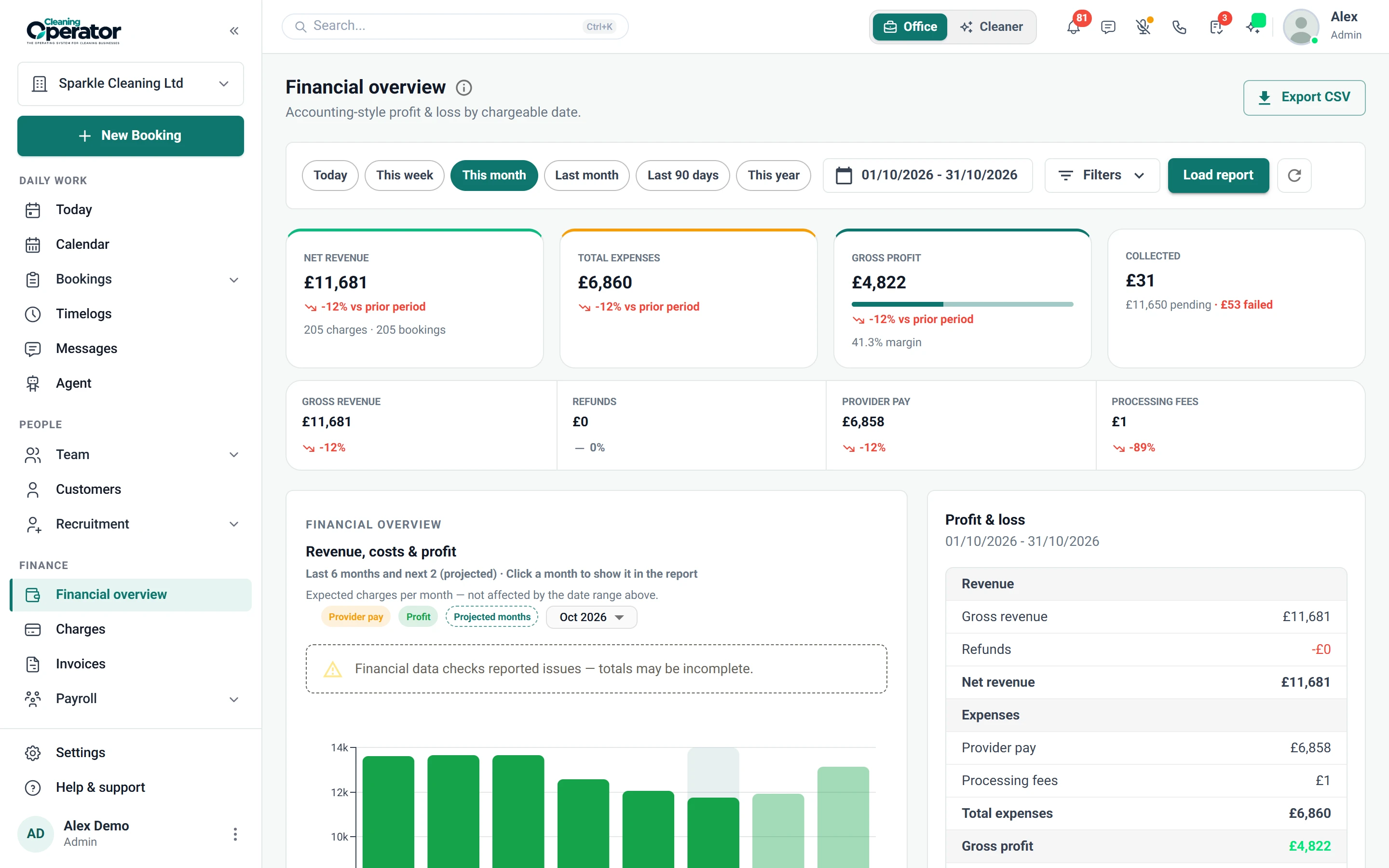
    Screenshot of Reports — Financial Report
  2. Customer reviews report

    Ratings and comments customers have left, by person and by service.

    The problem

    Feedback arrives by text, email and the odd phone call, so spotting a slipping standard comes too late.

    With Cleaning Operator

    Every rating and comment sits in one report, grouped by person and by service. Each customer's feedback also shows on their profile.

    • Reports → Customer Reviews
    • Ratings by person and by service
    • Results also show on the customer profile
  3. Booking changes log

    An audit trail of booking edits: who changed what and when.

    The problem

    Nobody in the office remembers moving a regular's clean, and the customer says they never asked.

    With Cleaning Operator

    The log settles it. Every booking edit is recorded with who changed what and when, and you can filter by action and date.

    • Reports → Booking Changes Log
    • Filter by action and date range
    • Each entry has a timestamp and a user
  4. Booking export

    Downloads booking data as a spreadsheet for your own records or your accountant.

    The problem

    Enterprise plan

    My accountant wants a year of bookings, and I'm copying jobs out of the diary line by line.

    With Cleaning Operator

    Your accountant gets a proper spreadsheet. Pick the dates you need and download the booking data, ready for them or your own records.

    • Bookings → Export
    • Export the dates you need

Get paid faster

More for getting paid.

11 — Payments

Payments: See Payments features

Take cash, save a card, or send an invoice — then collect what is due from one queue.

  • Stripe (card payments)
  • Add-card form (public / request a card)
  • Charges workbench (admin)

12 — Invoices

Invoices: See Invoices features

Send branded bills, remind people who have not paid, and let them settle from a link.

  • Invoice list and editor
  • Invoice settings

13 — Payroll

Payroll: See Payroll features

Pay from the hours they actually worked — then send payslips to the app.

  • Run payroll
  • Payroll history and payslips

Start today

Run the whole cleaning company from one system.

Online booking, the live team calendar, the mobile app, card payments and invoices, and payroll from clocked hours.

14-day free trial on every plan. Cancel anytime, no lock-in contract.