Skip to content
Cleaning Operator

Run your team

Cleaner management, documents and contracts

Cleaner paperwork, hours and last-minute changes are scattered across texts, folders and my head.Cleaning Operator keeps each cleaner's documents, hours, contract and app access in one place, and flags what needs your attention.

14-day free trial on every plan. Cancel anytime, no lock-in contract.

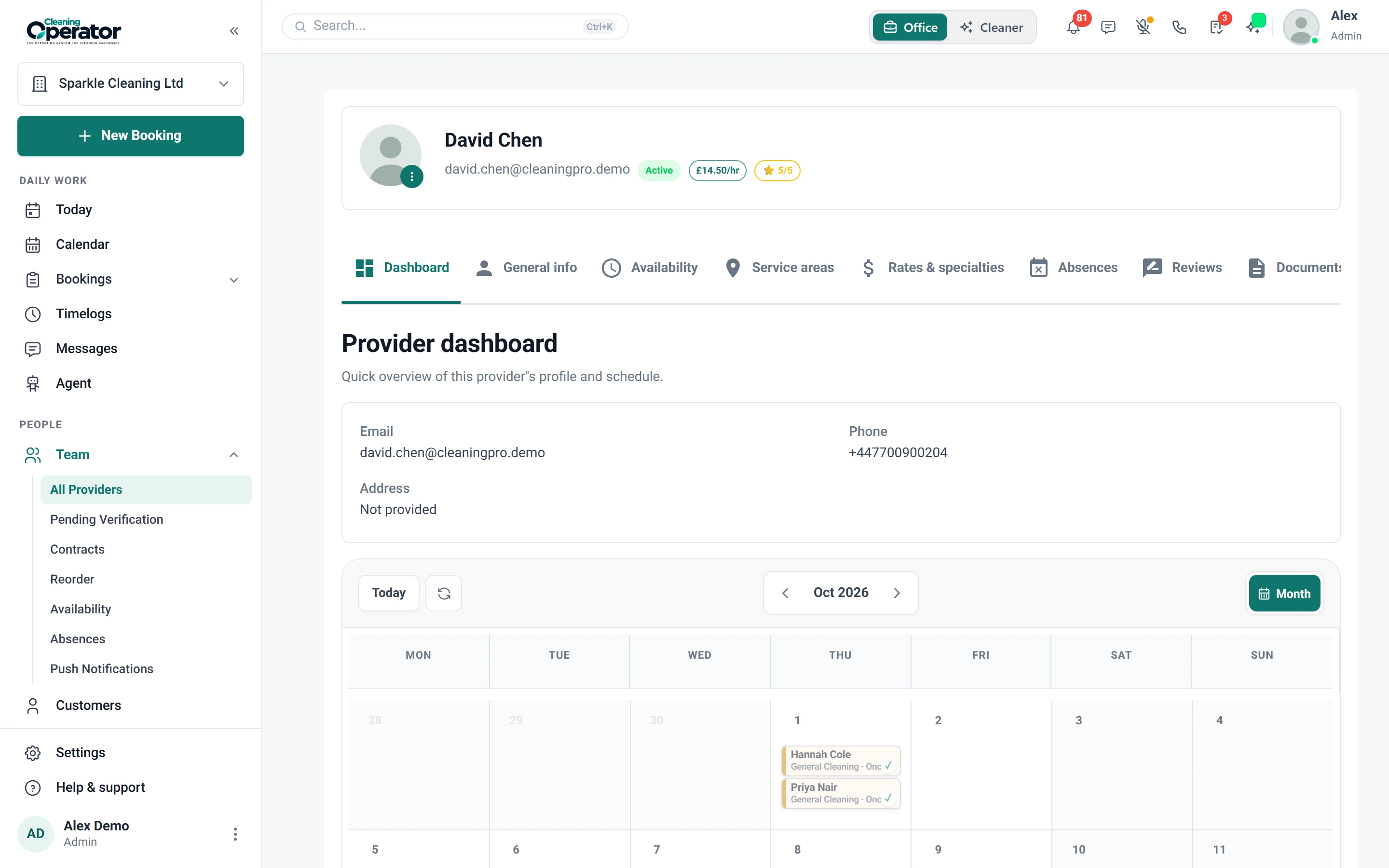
Screenshot of Cleaners — Cleaner profile

What is included

8 features in Cleaners.

The problem each one solves, then how Cleaning Operator fixes it, with the screens and settings named.

  1. Cleaner list, add, and profile

    A directory of cleaners with rates, specialties, photos and compliance documents.

    The problem

    I only find out a cleaner's DBS or insurance has expired when a commercial client asks to see it.

    With Cleaning Operator

    You spot expiring paperwork before a client does. Add expiry dates to DBS, insurance and right to work documents, and expired or expiring ones are flagged.

    • Documents: passport, driving licence, DBS certificate, right to work, insurance, contract, training certificate or other
    • Each document has a status (pending, verified, rejected) and optional expiry date; expired or soon-to-expire documents are flagged
    • Cleaners → Reorder sets the order cleaners appear
  2. Pending verification

    A queue of cleaners who registered themselves and need your approval before they get live jobs.

    The problem

    Cleaners who sign up online could be sent to a customer's home before anyone has checked them.

    With Cleaning Operator

    Self-registered cleaners get no live jobs until you approve them. They sit in a review queue, and a sidebar badge shows how many are waiting.

    • Appears when cleaner self-registration is on, with a sidebar badge count
    • Approve or follow up before they appear on the calendar
  3. Availability and absences (office)

    Weekly working hours for each cleaner and recorded time off, which Smart booking uses.

    The problem

    Jobs keep landing on a cleaner's day off or holiday because nobody updated the diary.

    With Cleaning Operator

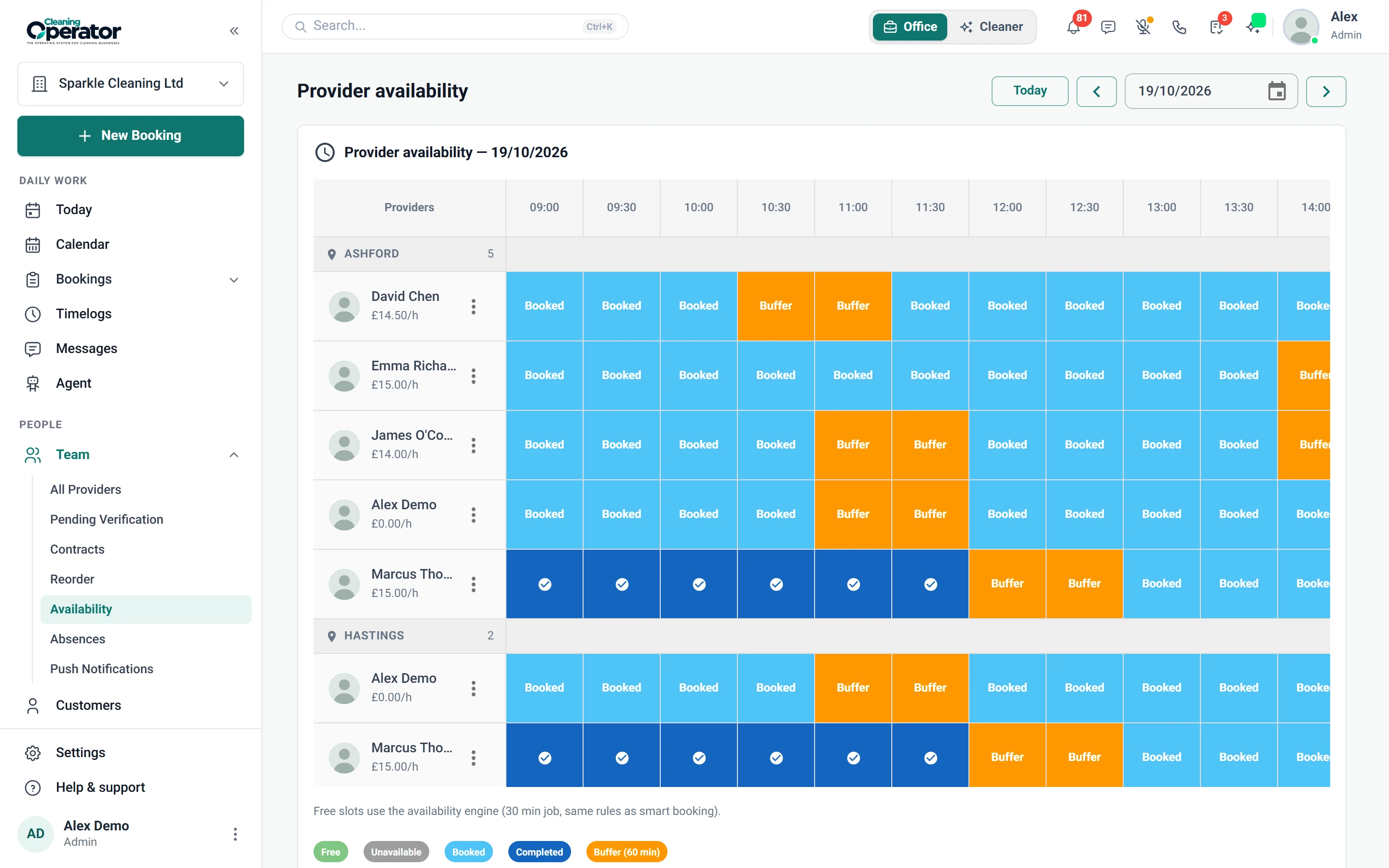
    Holidays and days off are built into the schedule. Record time off and it blocks assignment, and Smart booking works from each cleaner's weekly hours.

    • Cleaners → Availability sets weekly hours per cleaner
    • Cleaners → Absences records time off that blocks assignment
    • Cleaners can edit their own availability in the app only if Allow Schedule Modifications is on
    Screenshot of Cleaners — Availability
  4. Push notifications to cleaners

    Sends a push notification to cleaners' phones, for example a same-day update.

    The problem

    A cleaner calls in sick at 7am, and I'm phoning each affected cleaner with the new plan.

    With Cleaning Operator

    Same-day changes land on the right phones. Send a push notification from the office to just the cleaners who need the update.

    • Cleaners → Push Notifications
    • A same-day change reaches the phone
    • Sent from the office to the cleaners who need it
  5. Job requests (cleaner self-assign)

    Cleaners can request unassigned jobs from Available Jobs in the app.

    The problem

    Filling a spare job means texting the whole team, then untangling who replied first.

    With Cleaning Operator

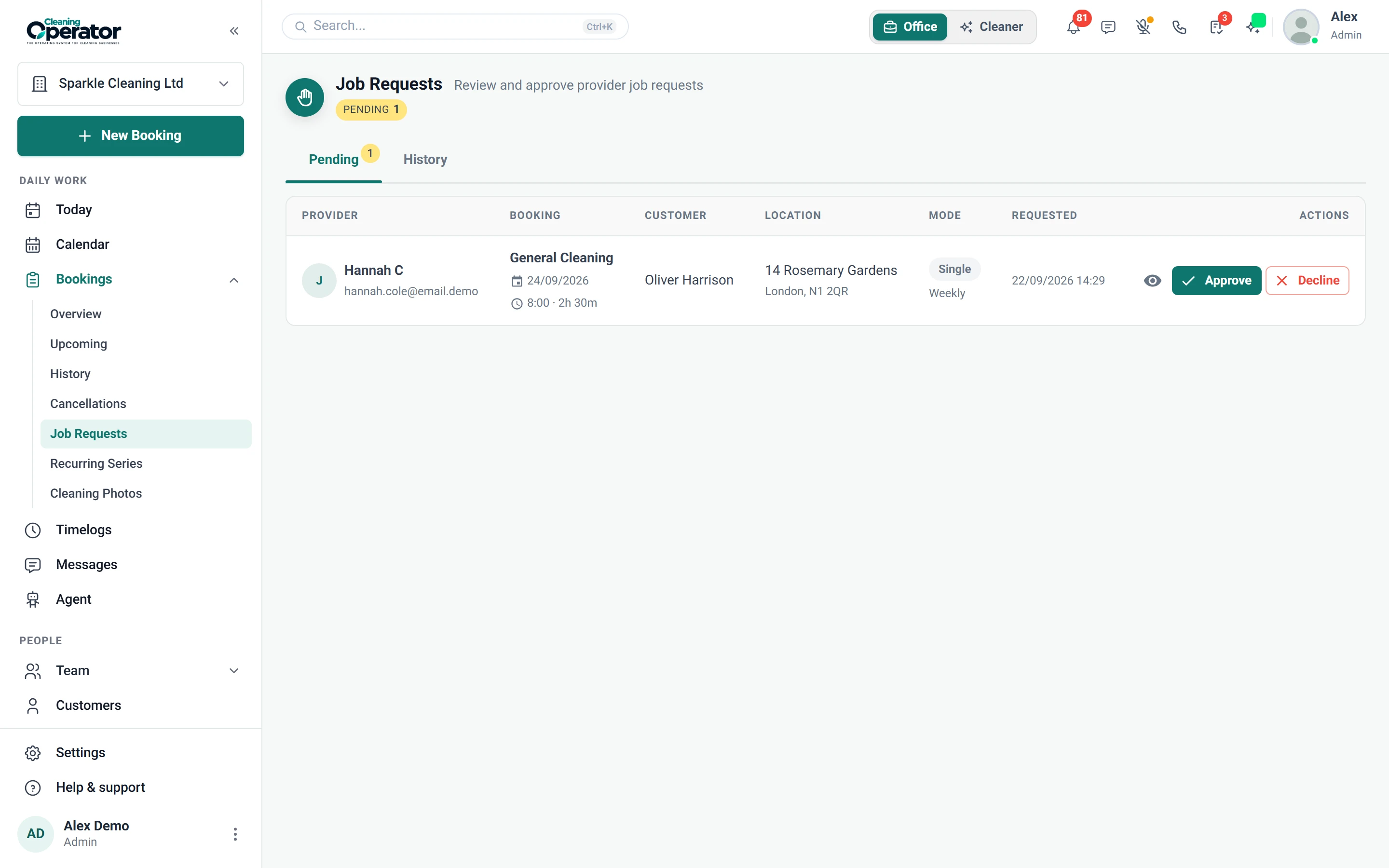
    Cleaners request spare work in the app, so nobody races to reply first. You approve or decline each request, or let them assign straight away.

    • Bookings → Job Requests: approve or decline
    • Require Approval on means you approve; off means they are assigned straight away
    • Allow Re-request After Decline off keeps a declined job hidden from that cleaner
    Screenshot of Bookings — Job Requests
  6. Cleaner portal / app settings

    Controls what cleaners see and can do in the app and web portal: prices, pay, contact details, ratings and clock-in rules.

    The problem

    I don't want cleaners seeing what the customer pays, or taking their mobile number for private work.

    With Cleaning Operator

    You decide what cleaners see. Switch prices, pay, customer email and phone on or off, and require photos at clock-in and clock-out.

    • Show Booking Price, Show Provider Payment, Show Customer Email, Show Customer Telephone and Show Own Rating
    • Enable Clock In/Out, Require Clock In Photo and Require Clock Out Photo
  7. Timelogs and cleaning photos (office)

    Clock-in and clock-out records that feed payroll, plus cleaning photos from jobs.

    The problem

    Hours for payroll come from memory, so when a customer says the cleaner left early, I can't check.

    With Cleaning Operator

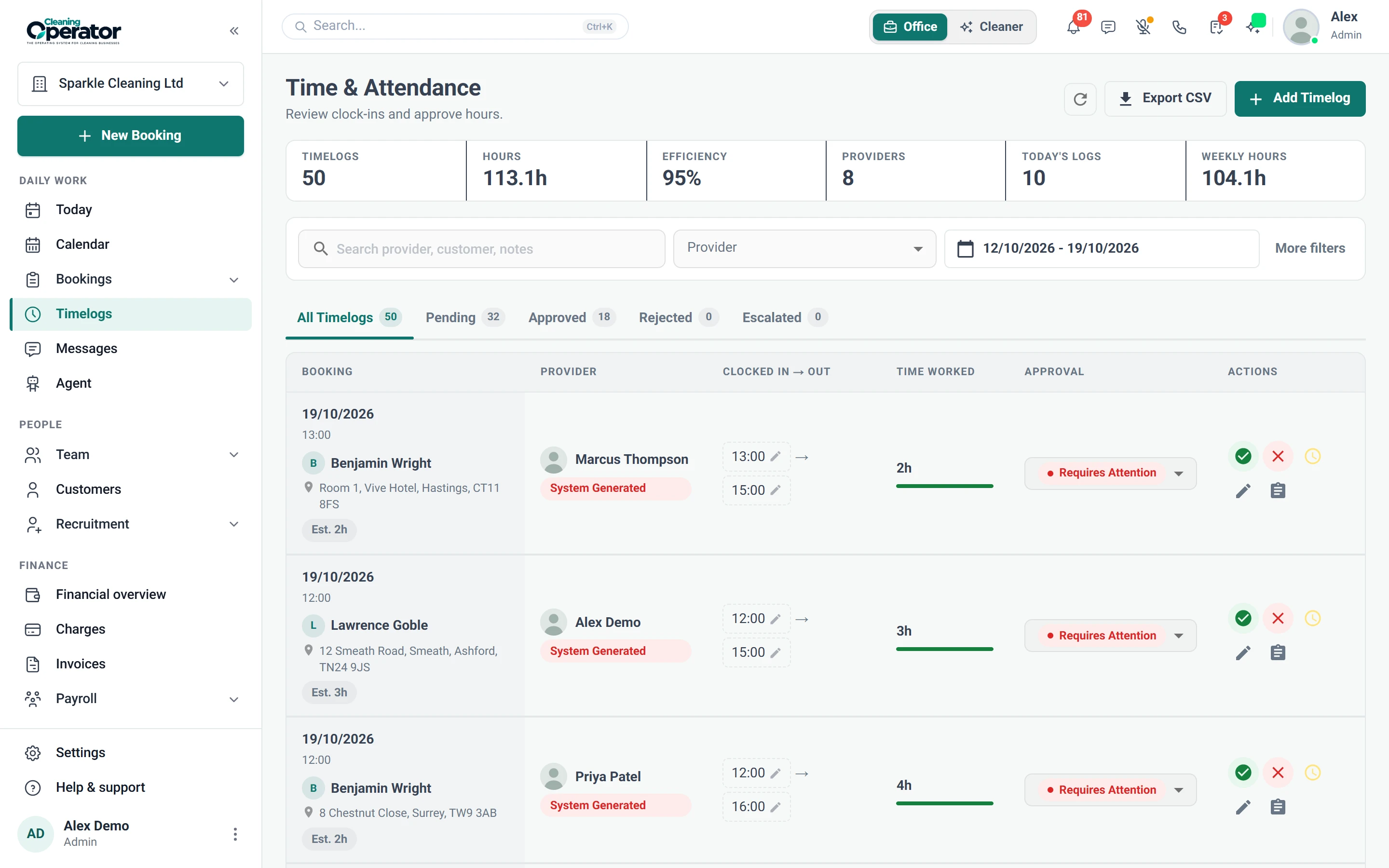
    Clock-in and clock-out times show when each cleaner arrived and left, and feed payroll. Approve, reject or escalate each timelog, and review job photos.

    • Approve, reject or escalate a timelog; approved and rejected logs lock
    • Unapproved logs also appear on the dashboard Needs attention list
    • Export timelogs as CSV from Bookings → Timelogs → Export
    Screenshot of Bookings — Timelogs
  8. Provider contract e-signing

    Write contract templates, email them for signing in the browser, and keep the signed PDF on the person's record.

    The problem

    New cleaners start work before their contract comes back signed, and the paper copy goes missing.

    With Cleaning Operator

    Contracts get signed online and filed for you. Email a template, see when it is opened and signed, and the signed PDF lands on their record.

    • Tags such as {{provider_name}} and {{business_name}} fill in automatically
    • Tracks when each contract is sent, opened and signed; unsigned links expire after 30 days
    • Signed PDF is stored on Cleaners → Contracts and, for a cleaner, on their documents

Run your team

Related features.

10 — Recruitment

Recruitment: See Recruitment features

Let people apply, score the forms, and hire into the same system they will work in.

  • Applicants
  • Recruitment settings
  • Cleaner self-registration (simpler path)

08 — Cleaner dashboard

Cleaner dashboard: See Cleaner dashboard features

Inside the Cleaning Operator app: today's jobs, clock-in, photos, chat and pay, on the phone in their pocket.

  • Sign in and workspaces
  • My jobs (Jobs tab)
  • Job details

01 — Booking

Booking: See Booking features

Take the call yourself, let existing customers book online, or put a booking form on your website — same services, prices, and availability everywhere.

  • Admin booking form
  • Public booking form
  • Customer portal booking form (self-service)

Start today

Run the whole cleaning company from one system.

Online booking, the live team calendar, the mobile app, card payments and invoices, and payroll from clocked hours.

14-day free trial on every plan. Cancel anytime, no lock-in contract.